
How to Batch Rename Files on Mac: Finder’s Built-In Way vs a Faster Right-Click Workflow
Finder’s Rename tool step by step (Replace, Add, Format), a naming formula that keeps folders tidy, and when a right-click tool helps. Just now -- -- A folder full of IMG_4821.jpg, Scan 3.pdf and “fin...
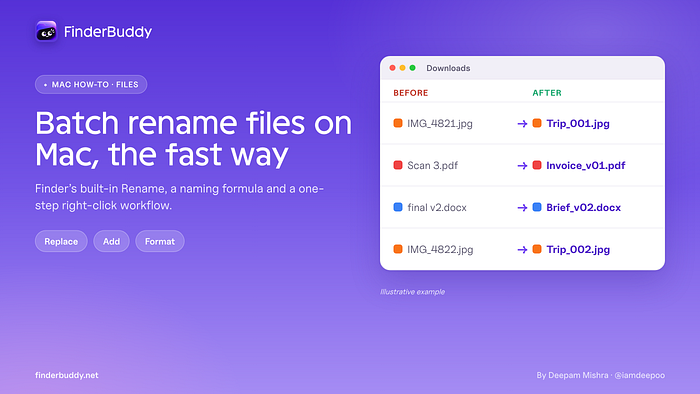
Finder’s Rename tool step by step (Replace, Add, Format), a naming formula that keeps folders tidy, and when a right-click tool helps.
Just now
--
--
A folder full of IMG_4821.jpg, Scan 3.pdf and “final final v2.docx” is hard to search and harder to share. Renaming 60 files one by one is the kind of job that eats a whole evening.
Many Mac users don’t know that Finder can batch rename files on its own. It has been built in for years, and it covers most everyday jobs. In this guide I’ll walk through all three Finder modes with real examples, share the naming formula I like, and then show where a right-click tool is faster.
Full disclosure: I built FinderBuddy, the app I mention in the second part. I’ll be clear about when you don’t need it.
The short answer: how do you batch rename files on a Mac?
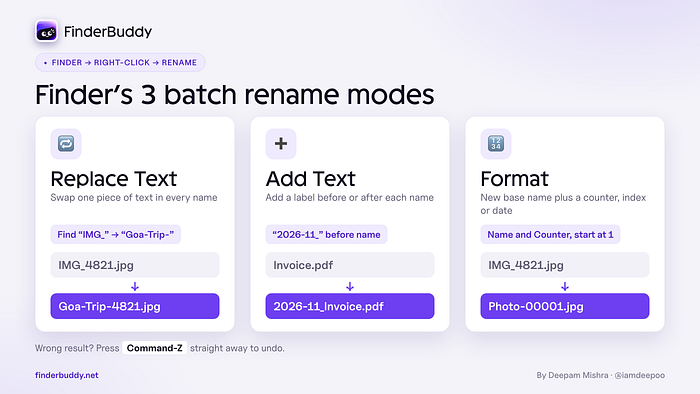
Select the files in Finder, right-click and choose Rename. Pick Replace Text to swap words, Add Text to put something before or after every name, or Format to give all files a new name plus a number or date. Check the example at the bottom of the dialog and click Rename. If you get it wrong, press Command-Z straight away to undo.
Finder’s built-in batch rename, step by step
1. Open the folder and select the files you want to rename (Command-A selects everything).
2. Right-click (or Control-click) any selected file and choose Rename. Finder shows how many items you are renaming.
3. Pick a mode from the first pop-up menu: Replace Text, Add Text or Format.
4. Fill in the fields and check the live example at the bottom.
5. Click Rename.
Mode 1: Replace Text
Use it when every file shares a piece of text you want to change. Put the old text in Find and the new text in Replace with.
_Example:_ Find “IMG_”, replace with “Goa-Trip-”. IMG_4821.jpg becomes Goa-Trip-4821.jpg. Leave Replace with empty to simply delete text, such as “ copy”.
Mode 2: Add Text
Use it to stick a label on every file without losing the original name. Type the text and choose before name or after name.
_Example:_ add “2026–11_” before the name to group a month of invoices together.
Mode 3: Format
Use it when you want a completely new, numbered name. Choose a name format: Name and Index (plain numbers), Name and Counter (zero-padded numbers like 00001, which sort neatly) or Name and Date. Then set Where (before or after the name), type a base name in Custom Format and pick Start numbers at.
_Example:_ Name and Counter, Custom Format “Product-Photo-”, after name, start at 1. You get Product-Photo-00001.jpg, Product-Photo-00002.jpg and so on.
Tip: sort the Finder window the way you want the numbers to run (for example by Date Created) before you start, then check the example and the first few results.
A naming formula that keeps folders tidy
Tools are only half the job. A consistent pattern is what makes files easy to find months later. This is the formula I suggest:
YYYY-MM-DD_Client-or-Project_What_v01.ext
Examples:
2026-11-02_Annapurna-Sweets_Invoice_v01.pdf
2026-11-02_Goa-Trip_Photo_014.jpg
2026-10-28_Website-Redesign_Brief_v03.docx
- Date first, as year-month-day, so files sort in time order automatically.
- Hyphens inside a part, underscores between parts. Easy to read, safe on every system.
- No spaces or special characters like / : ? which can break uploads and links.
- Version numbers with a leading zero (v01, v02) instead of “final” and “final-2”.
(Annapurna Sweets is a fictional example business.)
Where Finder’s Rename tool runs out of road
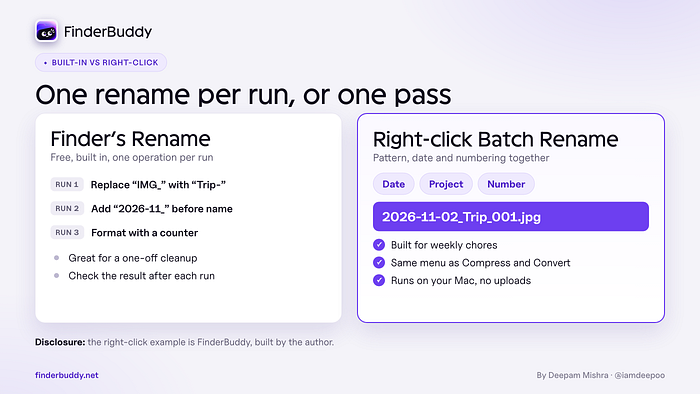
Finder handles one operation at a time. If you want to replace text _and_ add a date _and_ number the files, you run the dialog three times and check the result each time. It also hides inside the right-click menu as one item among many, and it’s easy to forget the exact settings you used last month.
Get Deepam Mishra’s stories in your inbox
Join StartsNest for free to get updates from this writer.
Remember me for faster sign in
For a one-off cleanup, that is fine. If renaming is a weekly chore (product photos, client invoices, scanned receipts), a dedicated tool saves real time.
The faster right-click workflow with FinderBuddy
Disclosure again: FinderBuddy is my app. It is a native Mac utility that adds file tools to Finder’s right-click menu, and everything runs on your Mac with no account and no uploads. Its Batch Rename tool handles patterns, dates, numbering and find and replace in one place.
1. Install FinderBuddy, open it once and allow the Finder extension when macOS asks. On macOS 15.2 or newer it is under System Settings > General > Login Items & Extensions, in the Extensions section.
2. Select a few files, or hundreds, in Finder.
3. Right-click and choose FinderBuddy, then Batch Rename.
4. Build your pattern, for example the date, a project name and a number, and run it on the whole selection.
Because it lives in the same menu as tools like Compress, Convert, Copy Path and Folder Tools, it fits a cleanup routine: rename a folder of photos, then compress them, without opening another app. It is free to try with a limited set of tools, and the full version is a one-time purchase with no subscription.
Which one should you use?
- Occasional cleanup of one folder: Finder’s Rename. It is free and already there.
- Renaming plus other file chores every week: a right-click toolbox like FinderBuddy.
- Files that should rename themselves automatically when they land in a folder: a rules-based app such as Hazel is built for that.
FAQ
Can I undo a batch rename on a Mac?
Yes. Press Command-Z (or choose Edit > Undo) in Finder right after renaming. Do it before you make other changes in Finder.
How do I add numbers to file names on a Mac?
Use Finder’s Rename and choose Format. Name and Counter gives zero-padded numbers that sort correctly, and you can choose the starting number.
Will renaming files break anything?
Renaming is safe for photos and documents. Be careful with files that other apps or links point to, such as files in a website project, because those references use the old name.
Bottom line
For most people, Finder’s built-in Rename is enough. Learn its three modes, pick one naming formula and stick to it. When renaming becomes a regular part of your week, moving it into a one-step right-click workflow is where the time savings start.
Try FinderBuddy free at finderbuddy.net.
If you found this useful, follow me here on StartsNest. I write about Local SEO, AI tools and building indie apps.
👉 Let’s connect on X: @iamdeepoo. I share daily SEO tips and what I’m building. Need help with your local SEO? Visit deepammishra.com.
_What’s the messiest folder on your Mac right now? Tell me in the comments._
Frequently Asked Questions
What is How to Batch Rename Files on Mac: Finder’s Built-In Way vs a Faster Right-Click Workflow about?
Finder’s Rename tool step by step (Replace, Add, Format), a naming formula that keeps folders tidy, and when a right-click tool helps. Just now -- -- A folder full of IMG_4821.jpg, Scan 3.pdf and “fin...
Which category does this article belong to?
This article is part of our Education collection on StartsNest.
Is this content free to read?
Yes, all articles on StartsNest are free to read. No registration required.

Daniel Reyes
Daniel Reyes is a software engineer and tech industry analyst with 8 years of experience in consumer electronics, charging technology, and mobile accessories. He specializes in breaking down complex technical specifications into accessible guides. His work focuses on USB-C, GaN charging, and power delivery standards.
View all articles by Daniel Reyes →More to read
The Love Trap: When Your Audience Adores You and Nobody Pays
Just now _This is a chapter from my book_ _Build in Public_ _, where I studied forty founders and companies to understand why transparency builds trust and growth for some and backfires for others. It...
A Finished Office You Can’t Move Into: The Compliance Steps Most Fit-Out Briefs Miss
1 hour ago One of the most expensive situations in commercial interiors is also one of the most avoidable: the office is built, the furniture is in, and the team still can’t move in. Usually the cause...
Phone screening that makes AI ranking fairer
Missing details make candidates look weaker than they are. Here’s how a voice agent closes the gap. Just now One quiet source of unfair ranking is missing information. If one candidate’s CV mentions t...
Comments (0)
No comments yet. Be the first to share your thoughts!