
Flutter + GCP + Machine Learning
1 hour ago -- -- TensorFlow Lite on the phone, Vertex AI in the cloud, one loop that learns The full loop: Flutter frontend, on-device TFLite inference, and GCP’s Vertex AI + BigQuery closing the retr...
1 hour ago
--
--
TensorFlow Lite on the phone, Vertex AI in the cloud, one loop that learns
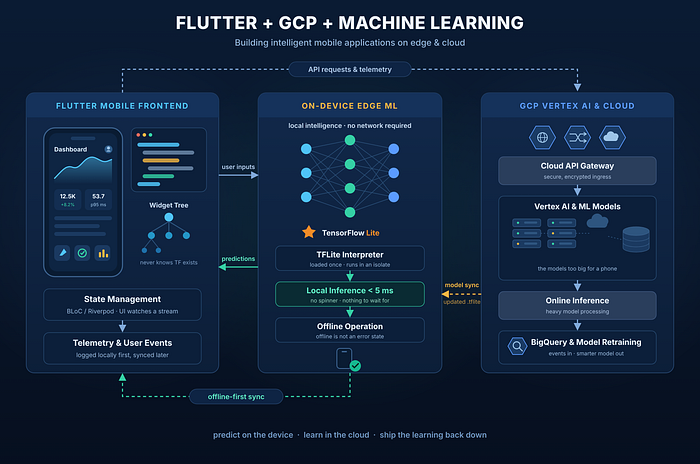
The full loop: Flutter frontend, on-device TFLite inference, and GCP’s Vertex AI + BigQuery closing the retraining cycle.
Our “smart” feature worked great on office Wi-Fi and died in a basement parking garage. The model was fine. The problem was me: I had built machine learning as an API call. Here’s the setup that fixed it, matching the diagram above: Flutter for the UI, TensorFlow Lite on the phone, Google Cloud for the heavy work.
The rule
One question decides everything: where should each prediction run?
- On the phone: fast, frequent, or private predictions.
- In the cloud: big, rare, or data-hungry ones.
Most apps need both.
The Flutter layer
The UI never knows ML exists. Widgets watch state (BLoC or Riverpod), and one small Dart interface decides whether an answer comes from the phone or the cloud. The app also logs every useful user action locally. That data trains the next model.
On-device: TensorFlow Lite
tflite_flutter loads the model once at startup and runs it in an isolate, so the UI never freezes. Answers come back in a few milliseconds. No spinner, because there is nothing to wait for.
> Offline isn’t an error state. Losing the network affects sync, not the feature.
The price: slightly lower accuracy, a bigger app, and different behavior per device. Test on cheap phones.
Get Farhan Sadik Galib’s stories in your inbox
Join StartsNest for free to get updates from this writer.
Remember me for faster sign in
The cloud: Vertex AI
Everything leaves the phone through one API gateway. Behind it, Vertex AI runs the models too big for a device. The phone gives a quick rough answer; the cloud refines it a second later.
The loop: retrain and sync
User events land in BigQuery. A Vertex AI pipeline retrains the model, converts it to TFLite, and the app downloads the new file and swaps it in on the next launch. No app store release needed. Two rules keep this safe:
1. Tie model versions to app versions, or old builds will crash.
2. Keep the old model on disk for instant rollback.
Underneath it all, events queue locally and sync with retries. Build it as if the phone is offline a third of the time, because for some users it is.
The toolbox
- tflite_flutter: runs the model on the phone.
- flutter_bloc / riverpod: state management; keeps ML out of the UI.
- drift: local SQLite queue for user events.
- dio: API calls and model downloads.
- path_provider: where downloaded models live.
- crypto: checksum check before swapping models.
Takeaways
Start simple: one cloud endpoint and a spinner. Measure it, then move only the slow, frequent predictions onto the phone.
> An ML feature is a loop, not an endpoint: predict on the device, learn in the cloud, ship the learning back down.
Once that loop closes, the model gets smarter without an app release. ML stops being a backend problem and becomes just another part of the app.
Frequently Asked Questions
What is Flutter + GCP + Machine Learning about?
1 hour ago -- -- TensorFlow Lite on the phone, Vertex AI in the cloud, one loop that learns The full loop: Flutter frontend, on-device TFLite inference, and GCP’s Vertex AI + BigQuery closing the retr...
Which category does this article belong to?
This article is part of our Usb Cable collection on StartsNest.
Is this content free to read?
Yes, all articles on StartsNest are free to read. No registration required.

Aisha Rahman
Aisha Rahman is a product researcher and consumer technology writer with 5 years of experience evaluating mobile devices, accessories, and digital services. She specializes in hands-on product comparisons, buying guides, and value analysis for budget-conscious consumers in emerging markets.
View all articles by Aisha Rahman →More to read
The Danger of the Brilliant Generalist (North Mondays Series • Episode 185)
Just now Why trying to be good at everything is the fastest route to being remembered for nothing The Danger of the Brilliant Generalist In January 2026, Indeed Hiring Lab data showed that 53% of all ...
Google Colab (Google Colaboratory) adalah layanan berbasis cloud dari Google yang memungkinkan Anda…
Google Colab (Google Colaboratory) adalah layanan berbasis cloud dari Google yang memungkinkan Anda menulis dan menjalankan kode Python langsung melalui browser tanpa perlu menginstal aplikasi apa pun...
New to Physical AI? Here Are 8 Terms You Should Know
Just now We’ve taught AI to write, draw, and answer questions. I work in a field where engineers are teaching it to interact with the physical world. Think about something as simple as picking up a cu...
Comments (0)
No comments yet. Be the first to share your thoughts!